
A creator can maintain a public social account, a free fan community, a paid membership, and a messaging subscription at the same time. The difficult part is that all four spaces may contain similar-looking posts while offering very different access rights.
A short video may be visible to everyone on a public channel, available only after creating a free account in a fan community, or locked behind a monthly membership. A paid tier may offer full-length videos instead of previews, earlier access to public releases, members-only livestreams, downloads, or an archive that is unavailable to free users.
The membership page alone does not show whether those benefits are useful in practice. Before paying, compare what a non-member can actually see with what current members receive, how far back the paid archive goes, whether files can be saved or played outside the platform, and what remains accessible after cancellation.
Free Access Boundaries Across Platform Types
“Free content” can describe several different levels of access. The most open form is a page that anyone can visit without signing in. Public announcements, trailers, schedules, short-form videos, and promotional posts often fall into this category. Some of these pages can also appear in Google, NAVER, or other search results, making them useful even to people who have never joined the creator’s community.
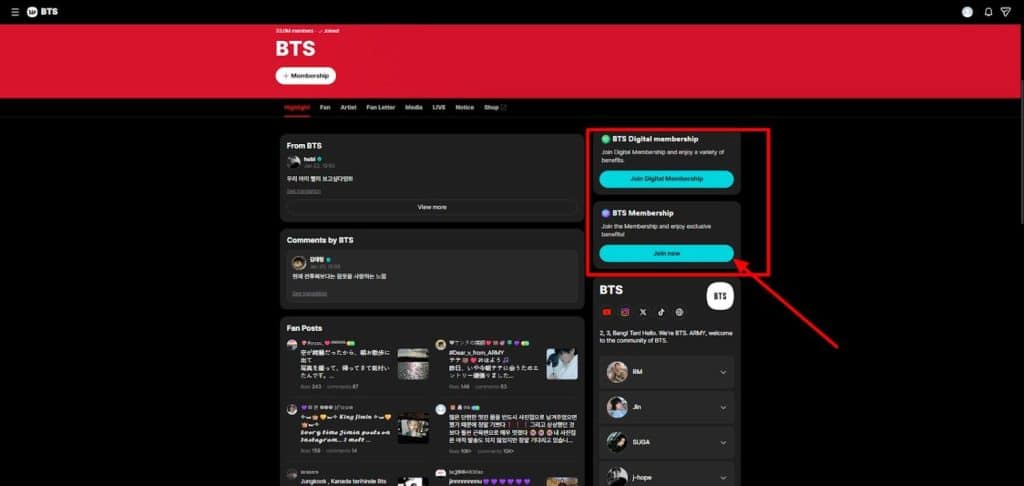
The second type is free but account-gated. No payment is required, but the viewer must create an account or join the community before reading posts, watching certain media, commenting, or receiving notifications. Weverse provides a useful example of this distinction. When it introduced Digital Membership, Weverse stated that its existing features would continue to be available through a free Weverse account, while Digital Membership would add optional premium benefits. Those paid benefits can include membership-only content, offline VOD downloads, additional video features, badges, and other community-specific benefits. citeturn390703search8
The third type is genuinely membership-restricted content. YouTube channel memberships can provide members-only videos, posts, badges, emoji, and other benefits. YouTube also notes an interesting distinction: a members-only video can sometimes be discoverable by non-members even though only users at the appropriate membership level can watch it. citeturn738349search17turn738349search9
That means search visibility and playback permission are separate issues. Before paying for any fan community, test the free side while logged out and again with a free account. Look for four types of material:
- announcements and schedules
- short videos or previews
- work-in-progress or behind-the-scenes posts
- public livestream notices and archives
Then search the creator’s name together with several recent post titles. This helps show whether the supposedly public material is exposed on the open web or only inside the platform.
Do not assume that “public” means search-engine indexed. Search engines may not index every platform page, and platforms can change how their pages are exposed. The useful distinction is whether a person without a paid membership can reach the content through an ordinary browser, whether a free login is required, and whether the material can be found outside the platform at all.
Paid Membership Benefits by Tier and Content Type
The next comparison should focus on what changes immediately after payment.
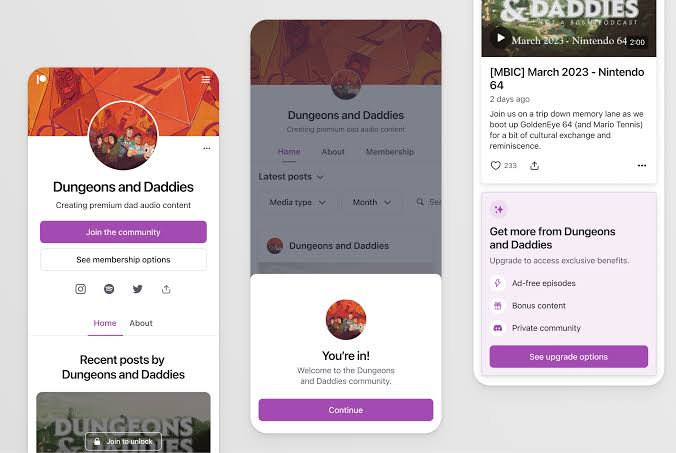
Common paid benefits include full-length videos, early releases, higher membership grades, members-only livestreams, downloadable media, exclusive posts, and additional community functions. The problem is that a platform’s general advertisement may describe benefits that a particular creator rarely uses.
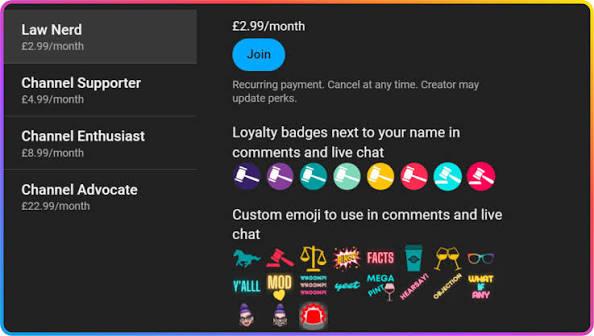
YouTube allows creators to create multiple channel-membership levels. Higher-priced levels automatically receive the perks assigned to lower levels as well, while creators determine the actual benefits attached to each tier. citeturn738349search0
As a result, “Gold,” “Premium,” or “VIP” has no consistent meaning between channels.
One creator might use the first level for badges and early videos and the second level for monthly livestreams. Another might offer almost the same content at both levels, with only cosmetic benefits separating them.
Weverse Digital Membership also warns that membership-only content offerings can vary by community. The platform provides the membership infrastructure, but that does not mean every artist community publishes the same volume or type of paid content. citeturn390703search8
The most useful comparison therefore combines the sign-up page with recent actual posts.
For each tier, record:
Advertised benefit → latest example → publication date → frequency → access level
If the page promises “exclusive video,” find recent examples. Determine whether they are full productions, short clips, livestream archives, or public videos released a few days early.
If it promises pre-release access, compare the members-only publication time with the public release. Receiving a video twelve hours early and receiving it three weeks early are very different benefits even though both can be advertised as “early access.”
If it promises members-only livestreams, examine recent notices. A tier that theoretically includes private livestreams has limited practical value if none have occurred for several months.
The same test applies to downloads. Determine whether “download” means a normal file saved to the device or an offline copy that remains controlled by the application.
Weverse illustrates the latter model. Its Digital Membership documentation says subscribers can download eligible VODs for offline playback, but the downloaded videos are played through Weverse, have a 30-day offline period, and cannot be played once the Digital Membership itself expires. citeturn390703search8
That is different from receiving a permanent MP4 file.
Historical Content Access and Membership-Tier Changes
The value of a membership can change dramatically depending on whether joining today unlocks older content.
Two services charging the same monthly price can produce very different first-month experiences. One may unlock three years of videos immediately. Another may expose only posts created during the current membership period or reserve older material for a higher tier.
The only reliable method is to inspect the archive after joining or find an explicit statement on the membership page before payment.
Start with the oldest visible paid post.
If the creator has been running the membership since January 2024 but the oldest post available to a new subscriber is from May 2026, find out whether the earlier material was deleted, moved to another tier, sold separately, or deliberately restricted to long-term members.
Tier changes require the same inspection.
On YouTube, a higher membership level includes the benefits of lower levels, but access still depends on the level the creator assigned to each piece of members-only content. citeturn738349search0turn738349search17 Moving upward can therefore unlock material restricted to that higher level, but the exact amount of additional historical content depends on the individual channel.
Do not estimate that value from the number of membership tiers alone.
A practical archive test can use three dates:
oldest visible members-only post → oldest post at the current tier → oldest post after upgrading
Also record the number of full videos, livestream archives, downloadable resources, and substantial posts rather than counting every short update equally.
Historical messaging products may behave differently from content memberships.
Weverse DM, for example, states that when a subscription expires, the user can no longer send or receive new artist messages through the subscription, but messages that were sent and received while the subscription was active remain readable. citeturn390703search11
That differs from a membership video library where access may end along with the subscription.
The word “archive” therefore needs to be defined for the product being purchased. A messaging history, a members-only video catalog, and a downloadable file library can each follow separate rules.
Download, Playback, Recording, and Sharing Restrictions
Paid access does not necessarily create ownership rights over the content.
Before subscribing for downloadable videos, photographs, audio, PDFs, or other media, check four separate questions:
Can it be downloaded?
Some services provide no download option. Others allow offline storage only inside their own application.
Where can it be played?
Content may work on web and mobile, while another product is app-only. Offline downloads can also be tied to the device or account used to obtain them.
Can the downloaded copy survive cancellation?
Weverse Digital Membership provides a clear example of why this matters. Its offline VOD feature allows temporary app-based downloads, but playback is unavailable when the Digital Membership expires. citeturn390703search8
A later Weverse notice concerning TREASURE Digital Membership also stated that when a particular membership-only content benefit was discontinued, existing offline-downloaded membership content would expire within a specified period. citeturn390703search2
Can the content be redistributed?
Membership access should not be interpreted as permission to repost the creator’s paid video, upload it to another site, distribute downloads, or share restricted media publicly. Check the service terms and any creator-specific rules before sending copies outside the membership space.
Screen recording belongs in the same category. Whether the device technically permits recording does not establish that redistribution is allowed. Some protected video environments may also restrict capture or external playback.
YouTube demonstrates another useful distinction between sharing a location and sharing access. A members-only video’s existence may be visible outside the membership, but viewers still need the required membership level to play the restricted video. citeturn738349search17
For someone subscribing mainly to build a personal archive, these details are critical. A membership with hundreds of downloadable-looking videos may have less long-term value than expected if every copy remains encrypted inside the app and stops working when the subscription ends.
Billing Periods, Cancellation, and Post-Cancellation Access
Cancellation should be examined before the first payment, not when the user has already decided to leave.
Start with the billing cycle. Determine whether the membership renews monthly, annually, on a fixed calendar date, or according to another schedule.
YouTube channel memberships operate through recurring payments, and YouTube states that a user who cancels can continue using the membership badge and creator benefits until the end of the current billing cycle. citeturn390703search3turn390703search6
This is different from receiving a prorated refund for unused days. YouTube’s cancellation guidance says that cancelling does not normally generate a refund for the remaining period before the membership officially ends. citeturn390703search9
Patreon currently follows a similar end-of-term pattern for ordinary paid membership cancellation: its July 2026 guidance states that paid-content access continues until the end of the relevant billing period and then ends unless the user subscribes again. It also notes that refunds are not typically provided simply because a membership was cancelled. citeturn738349search8
Platform rules can differ according to billing model, however, which is another reason to inspect the exact membership rather than applying one service’s policy to another. citeturn738349search23
Weverse Digital Membership is also a monthly auto-renewing product unless cancelled. citeturn390703search8 Purchases made through app stores can be subject to the respective store’s cancellation and refund process, while Weverse may publish special procedures when a membership itself is materially changed or terminated. For example, its TREASURE Digital Membership notice offered a special cancellation route after a membership-only content benefit was removed. citeturn390703search2
This distinction is useful when evaluating creator inactivity.
A creator failing to post for several weeks does not automatically create a universal right to a refund. The result depends on what the tier actually promised, the platform’s refund policy, and whether the creator or platform published an inactivity, suspension, or benefit-change notice.
From a member’s perspective, keep three records:
- the benefit description visible when joining
- recent posting dates
- payment receipts and renewal date
If a membership advertises one exclusive livestream every month and none occurs for an extended period, the original benefit description is useful when contacting support. If the benefit merely says “access to members-only livestreams” without promising a frequency, the situation is less clear.
Do not wait for the next charge while deciding. If the membership no longer provides enough value, turn off automatic renewal before the next billing date while checking whether existing benefits remain available through the paid period.
Pre-Subscription Access and Value Audit
A short audit before payment can prevent most membership disappointments.
First, examine the free area without paying. Record which announcements, schedules, videos, creator updates, and livestreams can already be viewed. Separate fully open web content from material that requires only a free account.
Second, open the exact paid tier rather than the platform’s general membership advertisement. List the benefits promised at that level.
Third, compare those promises with recent activity. Review approximately the last month or the latest eight to twelve substantial posts. Note whether paid members actually received full videos, early releases, livestreams, downloads, or other advertised material.
Fourth, investigate the archive. Determine the oldest paid content available to a new member and whether upgrading reveals additional historical posts.
Fifth, examine media restrictions. Find out whether downloads are permanent files or temporary offline copies, which devices support playback, whether membership-only material can be shared externally, and what happens to saved content after cancellation.
Finally, read the billing and refund conditions. Record the renewal date, cancellation method, remaining access after cancellation, and any policy covering major benefit changes or long periods of inactivity.
The result can be summarized as:
free content → paid additions → recent delivery → historical archive → tier restrictions → download and playback limits → cancellation access
This method makes very different fan products easier to compare.
A free community may already provide nearly everything a casual follower wants. A low-cost channel membership may be worthwhile because it contains a large archive of long videos. A more expensive membership may make sense for someone who regularly attends members-only livestreams. A messaging subscription may have value for a fan who wants frequent short artist updates even though it offers no permanent video library.
The relevant question is not how exclusive the membership appears. It is how much additional usable access begins after payment and how much of that access remains when the subscription ends.